
Alfred is the Swiss Army knife of applications. The base application is free but there is Pro version which adds a multitude of functionality.
I would be lost on my computer without Alfred. Not only do I use it as a Spotlight replacement but I’ve created a dozen workflows that help automate my common tasks. A couple of those workflows invoke shell scripts as part of the workflow. I use the text replacement utility constantly. I’m not sure how I would log out, put the computer to sleep, or shut it down without Alfred’s system commands. In summary, I could go on and on but Alfred is a most excellent and essential app.
The free version contains:
- Spotlight replacement
- Web search
- Calculate
- Spell checker
- System commands
- File Quick Look without opening it
The Pro (paid) version contains:
- Clipboard history
- Snippet expansion
- Workflows
- Hot keys
- Navigation & actions – Navigate file directory and perform actions on results
- Control music app
- Locate recently used docs for an app
- Themes
- Sync settings across Macs
- Shell Integration
If you decide to try out Alfred I recommend starting with the free version and replace spotlight. Then gradually try out other features. Finally pay for the pro version. You will not regret it.
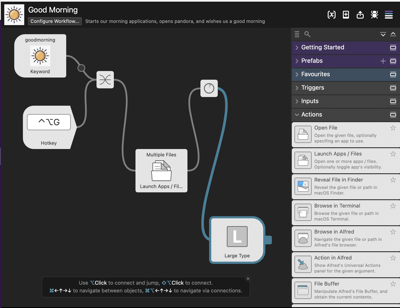
One last thing. The Alfred users have contributed to a “gallery” of workflows maintained by the Alfred team consisting of hundreds of workflows. If you prefer to roll you own the Alfred Workflow builder is simple and intuitive. Below is one of my workflows. In the morning I execute the Workflow by either entering “Good Morning” in the Alfred command bar or via the hotkeys I’ve defined. The workflow starts all my favorite apps if they are not already up and running:
Previous posts in this series


 Posted by molson46
  Number 6's Blog